Find a key/scale from MIDI file or notes (only Major/Minor)
Upload a .mid/.midi file or choose notes to find a key/scale.
Auto Scale
What this does
Finds likely Major/Minor keys from either a MIDI file or a set of notes you select (mouse/touch/keyboard).
Key vs scale
A scale is a set of notes (like A natural minor). A key usually means a scale plus a “home” note (the tonic) and a musical context. This tool lists Major/Minor keys (tonic + mode) that best fit your selected notes.
How results are shown
You’ll see possible Major/Minor keys for the notes you provided, ranked with the best guess highlighted. If a MIDI file is uploaded, the “Why the best guess?” dropdown explains the choice using which notes are most emphasized in the file.
What is “emphasis”?
In this app, “emphasis” means which notes show up the most in the MIDI file. If several keys match equally well, the list order uses this as a tie-break: the tool prefers keys where the “home” note and other important notes show up more often. (This only applies when a MIDI file is uploaded.)
Keyboard mode
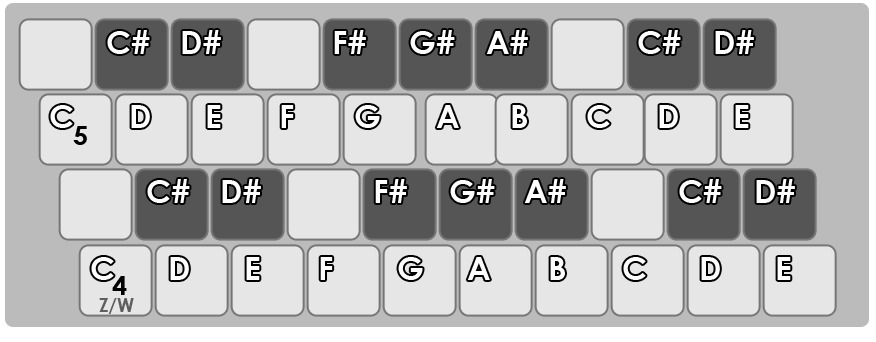
Keyboard mode lets you play notes using your computer keyboard (with sound). It maps keys by physical key position (so it works across different keyboard layouts).
Keyboard input modes
Record (accumulate) adds notes you play to your selection, so you can build a note set. Live (held) shows scales based on the notes you are holding down right now.
What does "tonic" mean?
The tonic is the "home" note—the pitch everything feels drawn back to. Knowing the tonic tells you the song's key, so you know which chords and melodies fit naturally.
Keyboard mapping
Keyboard mode lets you play notes using your computer keyboard. The mapping is shown in the image below and matches the common “computer keyboard piano” layout used in many DAWs (like FL Studio) and music tools.